
Alerting for Technical Disruptions

Trigger alerts automatically or manually and quickly reach the right technicians, on-call teams and responsible staff.










When a technical disruption needs to reach the right people fast
Whether it is a production line stoppage, a malfunction in technical equipment or an infrastructure outage, what matters is getting the information to the people who can respond. Alerting software helps ensure that predefined alerting workflows can be triggered quickly and the right people are reached.
When technical issues are passed on by phone, email chains or manual coordination, valuable time can be lost.
With safeREACH, prepared alerting workflows can be triggered manually or through connected systems. Technicians, on-call teams and other responsible staff are alerted directly, while responses remain visible in one central place.
This turns a technical alert into a clear, prepared response workflow.
Benefits of safeREACH for Technical Disruptions
Reach the right people quickly
Alert technicians, on-call teams or other responsible staff based on the type of disruption, location or area of responsibility.
Forward technical alerts automatically
Connected systems can trigger predefined alerting workflows in safeREACH when a technical issue is detected.
Keep responses visible
See who has received and responded to an alert, and involve additional people or escalation levels when needed.
How alerting works during technical disruptions
A prepared workflow helps avoid delays when a disruption occurs and makes responsibilities clear from the start.
1) A disruption is detected
A technical issue is identified by an existing system or noticed by a person.
2) The alert is triggered
An alert is started manually or automatically through a connected system or interface.
3) The right people are reached
Technicians, on-call teams or other responsible staff receive the alert through the defined channels.
4) Responses remain visible
Responses can be tracked centrally. If necessary, additional people or escalation levels can be involved.

"With safeREACH, we can react immediately, minimise downtime and reduce non-value-adding activities to a minimum."
Bernd Leitner
Project Manager Digitalization Division PBT-S at Lohmann & Rauscher

Over 20 years of experience in alerting
IT alerting, fire alerts, alerting company first responders and much more. ISO-certified server infrastructure. Used by SMEs, corporations, authorities and public organizations.
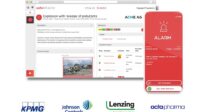
Automatically forward technical alerts from existing systems
Technical disruptions are often already detected by machines, equipment, monitoring solutions or other technical systems. What matters then is turning that technical alert into a targeted notification for the people who need to respond.
Through interfaces, existing systems can trigger a predefined alerting workflow in safeREACH. This allows technical alerts to be forwarded automatically to the appropriate technicians, on-call teams or other responsible staff without relying on manual communication.
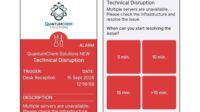
Reach technicians and on-call teams directly
Not every technical disruption requires the same response. Depending on the affected system, location, shift or area of responsibility, different technicians, on-call teams or other responsible staff may need to be involved.
With safeREACH, these responsibilities can be defined in advance. This helps ensure that alerts are sent directly to the people who are relevant to the specific disruption.
Especially outside regular working hours, prepared workflows help reach the right on-call staff quickly and avoid unnecessary delays in communication.
Alerts can also be delivered directly through the alert app.
Our experience
5,000
Customers
350,000
Users
150 M.
Alerts
20+
Years
Typical technical disruptions in practice
Technical disruptions can occur in many different areas. Who needs to be alerted depends on the affected system, location and area of responsibility. With predefined alerting workflows, organizations can decide in advance who should be informed in each situation.
| Example | People who may need to be alerted |
|---|---|
| Machine or equipment malfunction | Maintenance staff, technicians, shift supervisors |
| Failure of building or utility systems | Facility management, technical services, on-call staff |
| Temperature or cooling issue | Technical teams, operations, responsible on-call staff |
| Disruption to technical infrastructure | Operations teams, local technical staff |
| Server or system outage | IT team, IT on-call staff, responsible personnel |
What is a technical disruption?
A technical disruption is an unplanned event that prevents machines, equipment, systems or technical infrastructure from operating as intended. The causes can vary widely – what matters is that the issue is detected quickly and passed on to the people who can respond.
For organizations, this means that resolving the technical issue is only one part of the response. A clear alerting process for technical disruptions also helps define who should be informed, how they should be reached and what happens if no one responds.










Be prepared for different technical disruption scenarios
Not every technical disruption requires the same response. Depending on the event, location or area of responsibility, different people, on-call teams and escalation paths may be needed.
With safeREACH, appropriate alerting workflows can be prepared in advance. This helps ensure that, when a disruption occurs, it is already defined who is informed, how the alert is delivered and what happens if there is no response.
| Technical disruption scenario | Prepared alerting workflow |
|---|---|
| Production line stoppage | Alert maintenance teams and shift supervisors |
| Disruption outside regular working hours | Notify the responsible on-call team and escalate if needed |
| Technical issue at a specific location | Alert only the responsible people at the affected site |
| Critical disruption with wider impact | Involve additional responsible staff or emergency teams |

Integrate safeREACH with existing systems
Technical disruptions are often detected by machines, equipment, monitoring solutions or other existing systems. These systems can pass relevant information to safeREACH and trigger a predefined alerting workflow.
This allows a detected issue to automatically start an alert without relying on manual communication. Which technicians, on-call teams or other responsible staff are notified can be defined in advance for each use case.
safeREACH does not replace technical monitoring or fault detection. It handles the alerting and communication that follows.

"safeREACH has everything we need. The overall package is just perfect."
Hannes Pfisterer
Process & Business Continuity Manager at Drei Austria

FAQ
With safeREACH, responsible technicians, on-call teams or shift supervisors can be alerted directly. Alerts can be triggered manually or automatically through a connected system.
Yes. If an existing system detects an issue and passes the information to safeREACH, a predefined alerting workflow can be triggered automatically.
It means forwarding a technical issue directly to the people or teams responsible for responding. The goal is to reduce delays and make responsibilities clear before an incident occurs.
Yes. safeREACH can be used to alert responsible staff during machine, equipment and other technical disruptions, as long as the relevant people or systems are included in the alerting workflow.
On-call staff can be included in predefined alerting workflows and notified when needed. This helps organizations reach the responsible person quickly, even outside regular working hours.
No. safeREACH focuses on alerting and communication after a technical issue has been detected. Monitoring, diagnostics and technical troubleshooting remain with the existing systems and responsible technical teams.
Alert the right people during technical disruptions
Prepare alerting workflows in advance and quickly reach the right technicians, on-call teams and responsible staff when a disruption occurs.