
Physical vs. Mobile Silent Response Buttons for New York Retailers
How to choose the right setup for the January 1, 2027 requirement.
Starting January 1, 2027, retail employers with 500 or more retail employees in New York State must provide retail employees with access to a silent response button that can be used to request immediate assistance from a security officer, manager or supervisor in an emergency.
The New York Retail Worker Safety Act gives retailers flexibility in how this requirement is implemented. A silent response button can take the form of a physical button installed in an easily accessible location, a wearable device or a mobile phone-based button.
For retailers preparing for the January 1 deadline, this creates an important practical question:
Should employees use physical silent response buttons, a mobile solution or a combination of both?
The answer depends on how employees work, how stores are structured and how assistance should be organized after an alert is triggered.

Physical and mobile silent response buttons at a glance
| Physical silent response button | Mobile silent response button | |
|---|---|---|
| Best suited for | Fixed work areas | Employees moving throughout a store |
| Access | Easily accessible fixed location | Employer-provided mobile device |
| Mobility | Limited to button location | Moves with the employee |
| Typical environments | Checkout, customer service, back office | Sales floor, managers, security, mobile staff |
| Device required | Dedicated physical button | Employer-provided smartphone |
| Key consideration | Placement and accessibility | Device availability and accessibility |
| Location identification | Assigned store or work area | Depends on user and device configuration |
| Multi-store rollout | Store-level placement planning | Device and user management |
Neither approach is inherently better. The right choice depends on whether employees can reliably access the silent response function when they need it and whether the organization has a clear process for responding.
What is a physical silent response button?
A physical silent response button is installed at a defined location in the workplace and allows an employee to discreetly request assistance without first accessing a smartphone or another personal device.
The New York Retail Worker Safety Act explicitly permits physical buttons installed in easily accessible locations in the workplace.
Potential locations in a retail environment may include:
- checkout areas
- customer service desks
- back offices
- consultation or service areas
- other work areas where employees may need to request assistance
Physical buttons can be particularly practical where employees work at defined locations or where company-provided smartphones are not routinely available.
Advantages of physical silent response buttons
Immediate access at defined locations
Employees do not need to unlock a smartphone or open an application before requesting assistance.
No smartphone required
A physical button can provide access to the silent response function even where employees are not equipped with company mobile devices.
Clear location assignment
A button can be associated with a particular store or work area. This can help responders understand where assistance is required.
Simple interaction
In an emergency, requesting assistance can be reduced to pressing a dedicated button.
What should retailers consider when placing physical buttons?
New York law does not specify a fixed number of physical silent response buttons per retail location. Instead, physical buttons must be installed in easily accessible locations so employees can use the silent response function when needed.
Retailers should therefore evaluate their individual working environments rather than simply installing the same number of buttons in every store.
Relevant considerations include:
- the size and layout of the store
- where employees typically work
- whether a button can be reached quickly and discreetly
- separate work areas or back rooms
- customer-facing locations
- whether employees frequently move between different areas
- how responders will identify which store or area triggered the alert
A small-format store and a large multi-floor retail location may therefore require very different setups.
For retailers with multiple store formats, button placement should be treated as a store-level implementation decision rather than simply a hardware purchasing decision.
What is a mobile silent response button?
The Retail Worker Safety Act also explicitly permits a mobile phone-based silent response button.
Instead of going to a fixed location, an employee can request assistance from a mobile device they carry with them.
This can be particularly useful for roles that are not tied to one workstation and for employees who regularly move throughout the store.
There is, however, an important requirement:
Mobile phone-based silent response buttons may only be installed on employer-provided equipment.
Retailers should therefore not plan to rely on employees' personal smartphones when implementing a mobile solution for this requirement.
Advantages of mobile silent response buttons
Mobility
The silent response function moves with the employee instead of being tied to a defined physical location.
Individual access
Employees equipped with company devices can have access to the silent response function wherever their role takes them within the working environment.
Useful for mobile roles
Mobile triggering can be particularly relevant for Store Managers, Security, Loss Prevention, Asset Protection or other employees who already carry company-provided smartphones.
Flexible across different work areas
Where employees regularly move between the sales floor, stockroom, service areas and other parts of a store, a mobile trigger can complement fixed access points.
What should retailers consider with a mobile solution?
The most important practical question is whether the relevant employees actually have an employer-provided device available when an emergency occurs.
Retailers should consider:
- which employees receive company smartphones
- whether employees carry the device throughout their shift
- how quickly the silent response function can be accessed
- Wi-Fi and mobile network availability
- battery and device management
- user provisioning and access rights
- how the affected store or location is identified
- employee training
There is also a specific restriction concerning employee location data.
Mobile phone-based and wearable silent response buttons may not be used to track employee locations except when the silent response button is triggered.
Location permissions and the technical configuration of a mobile solution should therefore form part of the implementation review.
When does a physical silent response button make more sense?
A physical solution may be particularly suitable when employees primarily work at fixed locations.
Examples include:
- checkout areas
- customer service desks
- reception or collection counters
- consultation areas
- back-office workplaces
Physical buttons can also be useful when the retailer does not provide smartphones to every employee who needs access to the silent response function.
For example, a retailer could install dedicated buttons at several defined work areas so employees have a direct way to request internal assistance without relying on a mobile device.
The key question is not simply how many buttons are installed, but whether employees can access them quickly enough in the environments where they work.
When does a mobile silent response button make more sense?
A mobile approach may be particularly suitable where employees regularly move throughout a store and already use employer-provided smartphones.
This may include:
- Store Managers
- Security personnel
- Loss Prevention or Asset Protection teams
- supervisors
- other mobile retail roles
In these environments, relying exclusively on fixed access points may be less practical because the employee may not be close to a physical button when assistance is needed.
A mobile solution can instead make the silent response function available on the device the employee already carries.
Physical or mobile? For many retailers, the answer may be both
For many retail environments, choosing between physical and mobile silent response buttons does not have to be an either-or decision.
Different employees and work areas can have different requirements.
A retailer could, for example, provide physical silent response buttons at checkout areas, customer service desks and other fixed workplaces, combined with mobile silent response access for selected employees who already use employer-provided smartphones.
This hybrid approach allows the triggering method to reflect the way employees actually work.
Employees at fixed workstations have access to a dedicated button, while mobile employees can carry the silent response function with them.
Both types of triggers can then be connected to the same internal response process.

The button is only the beginning of the response process
Whether employees trigger an alert through a physical button or a mobile device, the trigger itself solves only one part of the problem.
The Retail Worker Safety Act requires the silent response button to enable employees to request immediate assistance from a security officer, manager or supervisor.
Retailers therefore also need to define what happens after the button is pressed.
Important questions include:
- Who receives the alert at each store?
- Should Store Management, Security or Loss Prevention be notified?
- Should several responders receive the alert simultaneously?
- How does a responder acknowledge the alert?
- What happens if the first designated responder is unavailable?
- How does the responder know which location or area requires assistance?
- When should the alert be escalated to additional people?
This is particularly important for retailers operating multiple locations.
A technical solution should not only make it possible to trigger an alert. It should also support a clear and repeatable response process.
How safeREACH combines physical and mobile silent alerting
safeREACH supports both physical and mobile approaches to silent alerting.
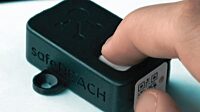
The safeREACH Wi-Fi Alarm Button can be assigned to a predefined alert scenario and a specific store or work area. When the button is pressed, the corresponding alert is triggered and designated responders are notified.
For employees equipped with employer-provided smartphones, the safeREACH Alert App can also be used to trigger a predefined silent alert from a mobile device.
Regardless of how the alert is triggered, the same safeREACH alerting process can include:
- predefined responder groups
- Store Managers, Security, Loss Prevention or other designated recipients
- acknowledgements
- predefined escalation paths
- additional communication
- documentation of the alert process
safeREACH therefore connects the trigger with the people and processes responsible for responding rather than treating the silent response button as an isolated device.
With more than 20 years of experience in critical alerting, safeREACH supports around 350,000 users across approximately 5,000 customers and has processed more than 150 million alerts.
Planning your silent alerting setup for January 1, 2027?
See how safeREACH Wi-Fi Alarm Buttons and the Alert App can be configured for silent alerting across your retail locations.
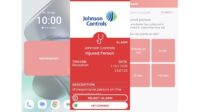
Example: combining physical and mobile triggering
A retailer could configure a store so that:
- An employee at the customer service desk presses a physical Wi-Fi Alarm Button.
- A predefined silent alert is triggered.
- The Store Manager and Loss Prevention team receive the alert.
- A responder acknowledges the notification.
- If necessary, the alert can be escalated or additional communication can follow.
At the same location, selected employees equipped with employer-provided smartphones could use the safeREACH Alert App to trigger the same or a corresponding response process while moving throughout the store.
This allows different triggering methods to be managed within one alerting environment.
Five questions to answer before choosing a setup
1. Where do employees work?
Identify fixed workstations as well as areas where employees regularly move throughout the store.
2. Which employees have employer-provided smartphones?
A mobile solution is only relevant where the necessary employer-provided equipment is available.
3. Where must employees be able to request assistance?
Consider whether fixed access points provide sufficient coverage or whether mobile access is also needed.
4. Who should respond?
Define the security officers, managers, supervisors or other designated internal responders who should receive the alert.
5. What should happen after the alert?
Define acknowledgement, escalation and communication processes before rolling the solution out across stores.
Answering these questions can make it easier to determine the appropriate mix of physical and mobile triggering for different retail environments.
Testing matters before a multi-store rollout
For retailers operating multiple New York locations, it can make sense to validate the chosen setup in representative store environments before deploying it more broadly.
A practical test can help verify:
- whether physical buttons are positioned appropriately
- whether mobile triggering can be accessed quickly
- whether alerts reach the intended responders
- whether the correct store or area can be identified
- whether acknowledgement and escalation processes work as intended
- whether employees understand how to use the solution
Testing is particularly relevant because affected employers must also train retail employees on the use of the silent response button before the January 1, 2027 requirement takes effect.
Frequently asked questions
No. The current Retail Worker Safety Act does not require retailers to use one specific technical form. A silent response button may be a physical device installed in an easily accessible location, a wearable device or a mobile phone-based button.
Yes. The law explicitly allows a mobile phone-based silent response button. Mobile phone-based solutions may only be installed on employer-provided equipment.
The law specifies that mobile phone-based silent response buttons may only be installed on employer-provided equipment. Personal employee smartphones should therefore not be relied upon for this implementation.
The law does not specify a fixed number of buttons per store. Physical buttons must be installed in easily accessible locations, so the appropriate number and placement depend on the individual retail environment.
Yes. The law permits different forms of silent response buttons and does not require employers to rely on only one form. Retailers can therefore evaluate whether a combination of physical and mobile access is appropriate for their stores and workforce.
No. Under the current law, the silent response button is intended to request immediate assistance from a security officer, manager or supervisor.
Choosing the setup that fits your retail environment
Physical and mobile silent response buttons solve the same fundamental problem in different ways.
Physical buttons can provide simple and direct access at defined workplaces. Mobile solutions can make the silent response function available to employees who move throughout a store and already carry employer-provided smartphones.
For many retailers, a combination of both may provide the most practical approach.
The more important question is therefore not simply whether to choose physical or mobile triggering. It is whether employees can reliably request assistance when they need it – and whether the right people and processes are ready to respond.
See how safeREACH works in your retail environment
We’ll show you how Wi-Fi Alarm Buttons, the Alert App and predefined response processes can work together across your stores.
This article provides general information about the New York Retail Worker Safety Act and does not constitute legal advice. Requirements may depend on an organization's individual circumstances. Employers should review the applicable law and current guidance from the New York State Department of Labor and consult qualified legal counsel where appropriate.